
Sure you're already a Facebook user who is good and right? Are there features that block the annoying when opening the world's largest social media is? Let us give important tips and tricks for you Facebook users, as reported from Gotta Be Mobile following:
How to Stop Facebook Game Request
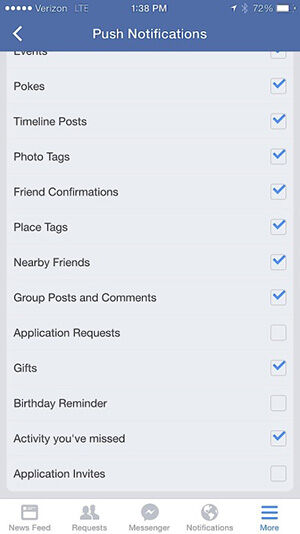
How many people were upset when the notification is filled by an offer to play games on Facebook are not necessarily interesting for him? Be thankful on Facebook is no easy way to stop the notification interrupt it. On Facebook for Android, you only need to press the three dots on the right top> App Settings> Remove the tick in the Application Requests option.
Remind Facebook To Remove Post Does not Want You See
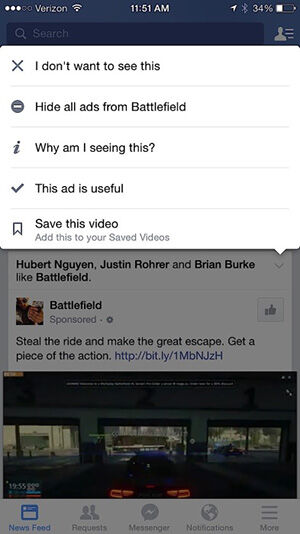
You can know removes the post from the ad or people who do not you like about the timeline with ease. So that you do not need to bother again have to remove it manually, you just press the arrow in the upper right corner of the post and select the I do not want to see this. For advertising, you can choose the option Hide all ads from [account name].
Unfollow Someone Without Having Breaking Friendship with Them

If you want to remove the entire post from one of your friends in the timeline, but did not want to deprive He of friendship, then how exactly are you simply must visit the profile page of him and press Following. Later button will automatically turn into unfollowing.
Save A Post To Can Read in Another Time
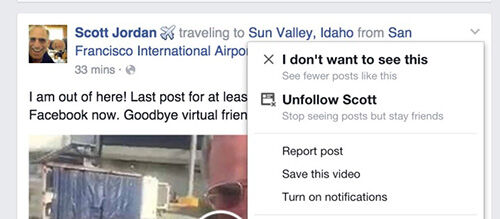
You find interesting posts on Facebook, but you could not read at that time. Then you can click the arrow in the upper right corner of the post and select Save the post. Later this post will appear in the Saved under News Feed so that you can read it on another occasion.
Stop Alert After You Commenting
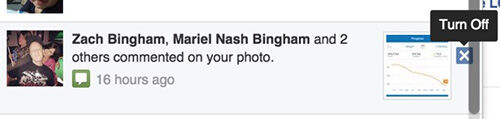
If you commented on one of your friends' posts, and the next there are people who participated comment on the post, then you will get a notification of comments belonging to that person. If it is very annoying, just turn off by clicking the X on the right notification that appears.
Always See the video on Facebook in HD Mode
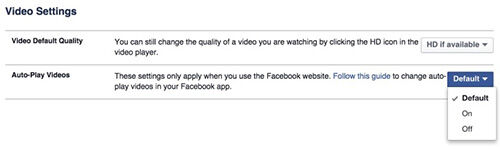
If your internet connection is fast, then watch the video in high resolution format is a good choice. To make each video that you see on Facebook to HD by default, you only need to go to Settings> Videos> Video Default Quality> HD if Available.
Turn off notification Birthday
Knowing friend the birthday fun heck yes. But if in Facebook, you just filled me with a birthday reminder someone, certainly quite disturbing huh? Turn off the course with Facebook> Notifications> Birthdays> Edit> Off. Through this way, you will not be bothered by notification Birthday again, but the sign will remain in the top right corner of the News Feed.
Home /
Gadget /
Games /
Tech news /
Tips & Trick /
7 Effective Tips and Tricks For You Facebook Users
Monday, March 30, 2015
7 Effective Tips and Tricks For You Facebook Users
Share this
Related Articles :
Subscribe to:
Post Comments (Atom)
About Me

Popular Post
-
iPhone is one of the most widely used smartphone at this time , with more and more users , the more of the individuals who want ...
-
Remove system apps ( bloatware ) in Android is not a difficult thing . By removing unimportant applications installed on the An...
-
Ever kepikiran not to disguise the essential applications on your computer? Or just a fad to change the icon of an application with another...
-
In this age of sophisticated as today is everything so easy yes , including changing the printed documents into digital is inc...
-
When there is a failure during the update or PC we run into a problem, the first thing to do is restart, and then there are the so-called...
-
Eliminate ads on Android Google Chrome browser can now be done easily using the following applications. Here JalanTikus will tell an easy w...
-
Who says to make Android Applications must be aware of the most elaborate coding? If you wish to make an Android app for Web or Blog, you ...
-
This time JalanTikus will provide a way to track who is viewing your Facebook profile. Outside there a lot of which offer a similar m...
0 komentar
Post a Comment